New: Refreshed product demos for Netta IUCLID, Review and Cite. Watch them

Netta Tech
← All products

Netta Inbox

Email rewriter for the tone you actually need: professional, strongly-worded, friendly, done.

Netta Inbox is a professional email rewriter built for non-native English speakers and regulated-industry writers. Paste a draft, pick a tone, get back a refined version that lands the way you meant it. EU-hosted, nothing retained. And no, it does not read your inbox.

Book a demo

Netta Inbox

See how it works →

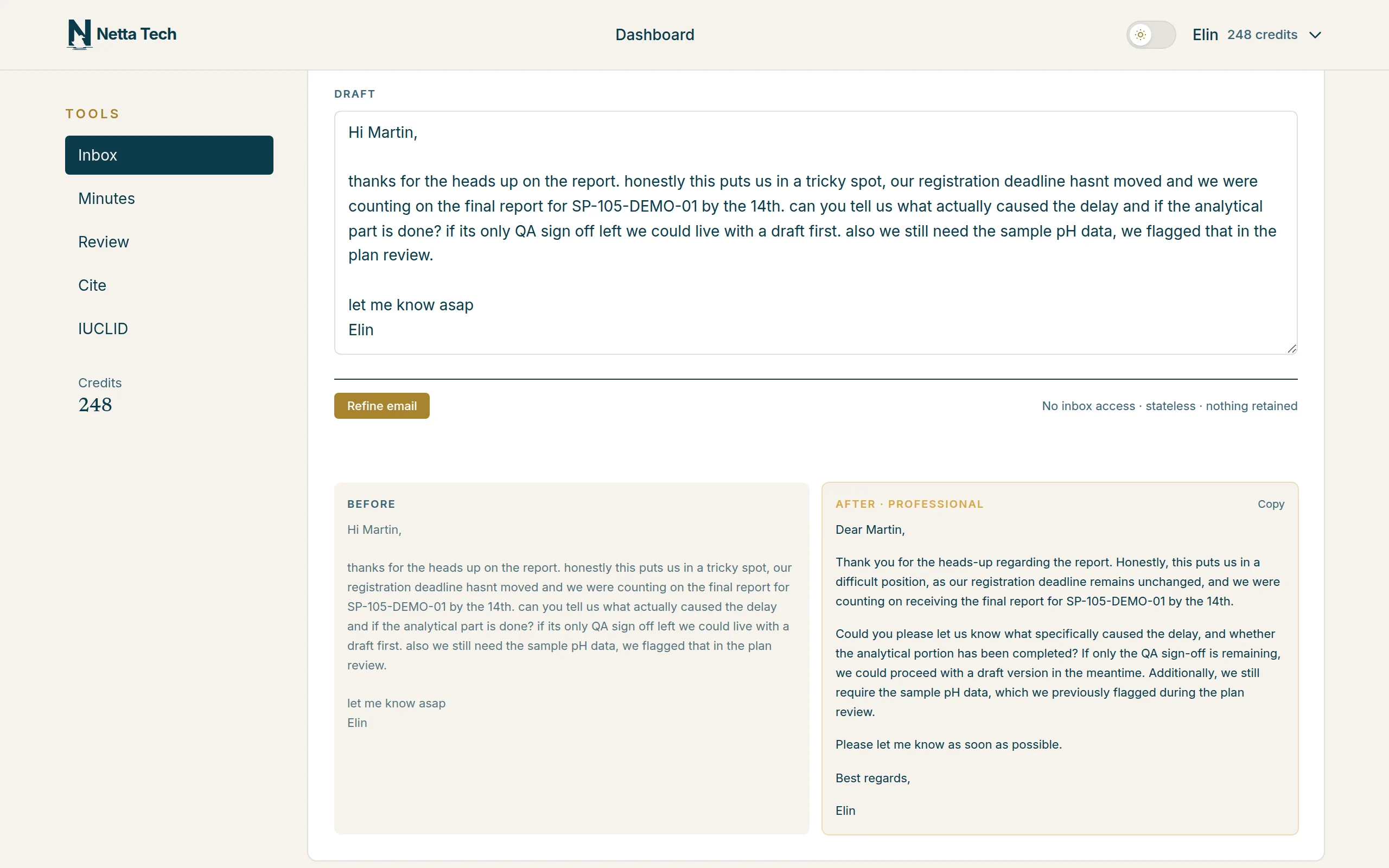
Output: before and after

Netta InboxTone refineIllustrative input · actual tool output
Netta Inbox: the original draft and the professional rewrite side by side
  1. Your original draft
  2. Rewritten in the chosen tone
  3. Copy the rewrite
for every professional situation
5 tones
per rewrite
Seconds
stored or retained
Nothing

Scope

  • 5 tones Succinct, professional, strongly-worded, friendly, instructional
  • Non-native English Grammar and clarity refinement
  • Regulatory writing For emails to auditors and regulators
  • Nothing retained No account, no inbox access
  • EU-hosted Under DPA prohibiting training
  • Any language Refines in the language you write

How it works

From a messy draft to a sent-ready rewrite.

  1. Paste your draft

    Write it the way you normally would. Any length, any messiness, any level of English. You keep the intent, we fix the delivery.

    1. Your draft
    2. Refine email
    3. No inbox access, nothing retained
  2. Pick a tone

    Five options tuned for professional situations: succinct, professional, strongly-worded, friendly or instructional. One click.

    1. Five tones
    2. Selected tone
  3. Get the rewrite in seconds

    The refined version comes back almost immediately. Grammar, clarity and tone are fixed; your content and intent are preserved word-for-word where they matter.

    1. Your original draft
    2. Rewritten in the chosen tone
  4. Copy and send

    Paste the rewrite into whichever mail client you already use. Netta never touches your inbox, never sends anything, never stores the draft.

    1. Copy the rewrite
    2. Your points, kept and clarified

Input: your draft and a tone

Netta InboxTone refine
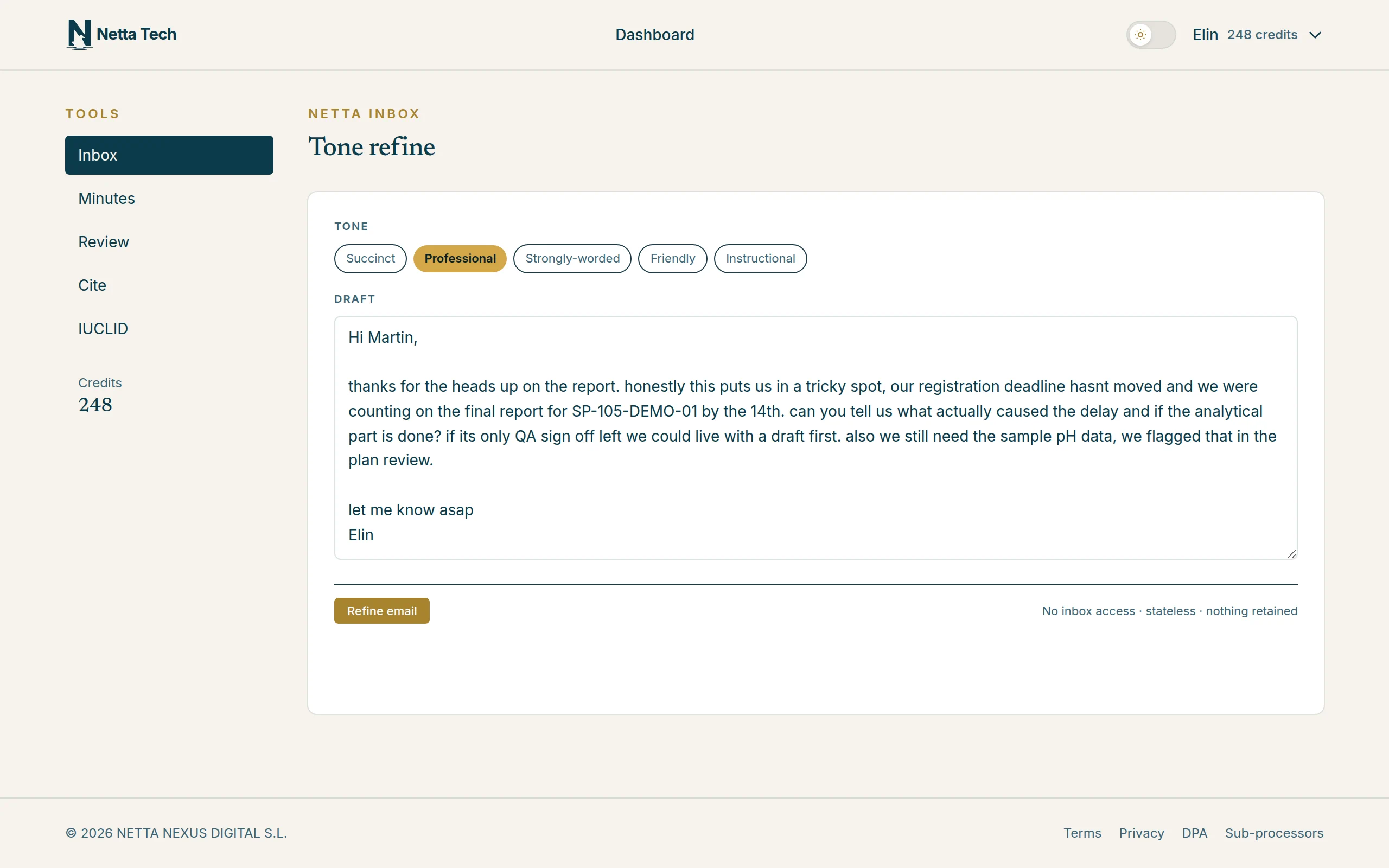
Netta Inbox: your draft, the tone picker and the privacy note
  1. Your draft
  2. Refine email
  3. No inbox access, nothing retained
  1. Five tones
  2. Selected tone
  1. Your original draft
  2. Rewritten in the chosen tone
  1. Copy the rewrite
  2. Your points, kept and clarified

You stay in control of every word. Netta Inbox rewrites the tone; you review, copy and send from your own mail client. Nothing goes anywhere automatically.

What it changes. What it never touches.

What it changes. What it never touches.

5 tones

  • Succinct
  • Professional
  • Strongly-worded (for firm-but-polite pushback)
  • Friendly
  • Instructional
  • Preserves original intent

Refinement

  • Grammar and clarity
  • Non-native English smoothing
  • Register consistency
  • Sentence structure
  • Professional vocabulary
  • Keeps the writer’s voice

Preserves content

  • Original facts retained
  • Numbers and dates untouched
  • No invented claims
  • No added recipients
  • No silent truncation
  • Length adjustments on request only

Nothing retained by design

  • No inbox connection
  • No account creation
  • No history storage
  • No IMAP / SMTP
  • No attachments
  • No calendar

Deployment

EU-hosted by default. On-premise on request.

Cloud

EU-hosted SaaS

  • Hosted in the European Union
  • LLM inference in EU regions under enterprise DPA
  • Contractual prohibition on training on client data
  • Live today. Book a demo to get started

On-premise

Available on request

  • Air-gapped deployment for the most sensitive teams
  • Quoted per engagement. Discuss during the demo
  • Integration with your internal tools on request
  • Compatible with hardened environments

Why Netta Inbox

We didn’t build another email client.

Most AI email tools want to live inside your inbox, route your messages and read your threads. Netta Inbox does one thing: takes a draft you already wrote and returns it in the tone you actually need.

  • Full email-client AI takeovers that require switching tool

    Paste-and-rewrite: you keep your existing mail client

  • Generic tone shifters with no compliance context

    Built for regulated-industry writing: auditors, regulators, compliance teams

  • Student and marketing tone libraries

    Professional tones: strongly-worded, instructional, the ones adults actually need

  • Opaque training policies on everything you paste

    Nothing retained: nothing stored, EU DPA prohibits training on your data

  • US-hosted tools with vague GDPR claims

    EU-hosted, explicit data residency, signed DPA on request

Questions

The ones a compliance officer asks first.

If yours isn’t here, a 30-minute demo is the fastest way to get it answered. We don’t do gated whitepapers.

Book a demo
Does Netta Inbox read my inbox?
No. There is no IMAP connection, no OAuth to your mail account, no inbox scanning. You paste a draft in a web form; that is the only input.
Does it send the email?
No. Netta Inbox never sends anything. It returns the rewritten draft and you paste it into your own mail client.
Which tones are available?
Five: succinct, professional, strongly-worded, friendly and instructional. Each one is tuned for real professional situations, not marketing copy.
Does it change the meaning of my email?
No. The system prompt is explicit about preserving the original content and intent. The tone rewriter refines grammar, clarity and register. It does not invent facts, add recipients or truncate silently.
What about non-native English speakers?
This is one of the core use cases. Netta Inbox smooths grammar and register for people who write perfectly intelligible English but want it to land with the same authority as a native speaker.
Where does my draft live after I use it?
Nowhere. Drafts are not stored, not kept and not used to train models. EU-hosted under a DPA that prohibits use of your drafts for model training.
Does it translate between languages?
No. It refines the draft in whichever language you wrote it. Translation is a different tool and deliberately out of scope.
How do I access it?
It is live today. Book a demo and we will set you up within the week.

Get in touch

Ready to see it work on your documents?

Book a 30-minute call. No slides. We run your real documents through the system and you see the output. If it does not save you time, we will tell you.